Skip to content
Zarela

AI Agents

AI agents for the whole back office

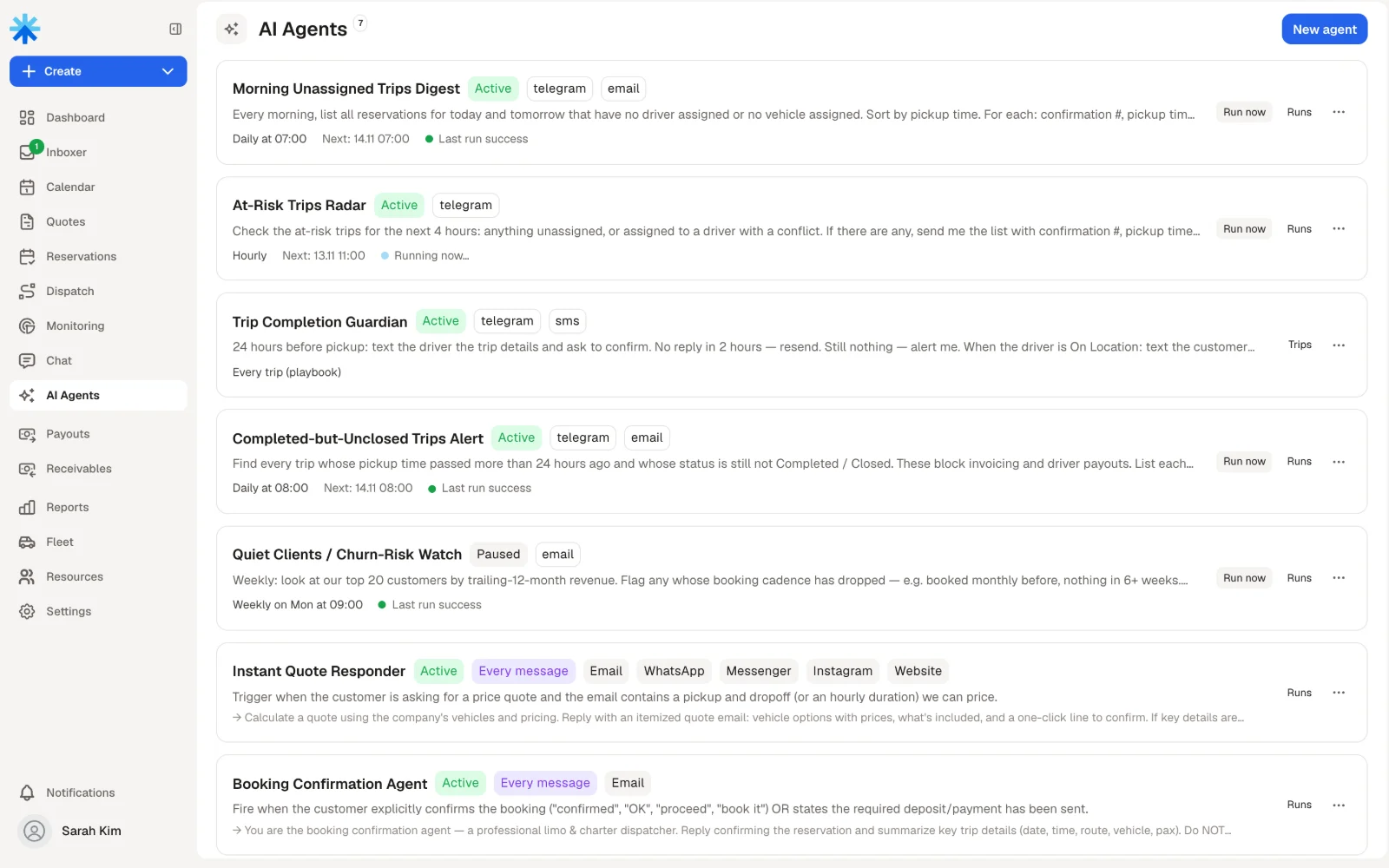
Some answer customers the moment a request comes in. Others run on a schedule and report to your team. All of them work from your live trips, drivers, and rates.

The AI Agents page in Zarela with agents, their schedules, and their status

Always on

Agents that answer as work comes in

They sit where requests arrive and do the first pass, so your team spends its time on decisions.

Quotes out in minutes

The Email & Quote Agent reads every request, pulls out the trip details, prices it from your vehicles and rates, and drafts the reply.

  • You approve, then it sends
  • Handles broker and affiliate email too
  • Sends confirmations once a customer accepts or pays

Quote request7:42 AM

Dana Reyes, Northlight Events

Hi! We need a Sprinter for 12 people from JFK Terminal 4 to The Greenwich Hotel on Friday, Nov 14. Our flight DL 402 lands at 7:40 PM.

Draft replyAgent

Sprinter, airport transfer$285.00

Meet and greet$50.00

Tolls (est.)$18.50

Gratuity 20%$57.00

Total$410.50

Approve & sendEdit

Ask your operation anything

Zarela Copilot answers in plain English from live data: who is unassigned tomorrow, which trips are at risk, what a client booked last month.

  • Works on the web and in the Dispatch App
  • Also answers in Telegram
  • A briefing every morning

Zarela Copilot

What’s unassigned tomorrow?

2 trips still need a driver:

6:15 AM · LGA → MidtownSedan

9:30 AM · JFK → GreenwichSprinter

Assign Marco to the 9:30

Booking calls. The AI call agent answers the phone, quotes the trip, and texts the customer while your team listens in.

Customer chats. The chat agent replies on WhatsApp, Instagram, Messenger, and your website, with Take over and Hand back for your team.

Template gallery

These are the templates in the product today. Turn one on as it is, or edit its instructions first.

  • Morning Unassigned Trips Digest

    Every morning list today's and tomorrow's trips with no driver or no vehicle, sorted by pickup time.

    ScheduleDispatch & Drivers

  • Completed-but-Unclosed Trips Alert

    Finds finished trips that were never closed out: money stuck before invoicing and driver payout.

    ScheduleRevenue & Billing

  • Daily Financial Summary

    One email a day: bookings taken, revenue, payments received, outstanding balance, driver payouts due.

    ScheduleReports & Digests

  • Unanswered Booking Requests

    Revenue at risk: inbox booking requests nobody replied to, with a suggested quote for each.

    ScheduleRevenue & Billing

  • Quiet Clients / Churn-Risk Watch

    Weekly watchlist of top customers whose booking cadence dropped: before they disappear for good.

    ScheduleRevenue & Billing

  • Driver Trip-Report Nudge

    Every evening remind drivers of today's completed trips to submit expenses and the trip report.

    ScheduleDispatch & Drivers

  • Tomorrow's High-Value Trips Brief

    Evening brief of tomorrow's high-value trips: who, when, vehicle, driver: flags any without a driver.

    ScheduleReports & Digests

  • Weekly Fleet Utilization Report

    Which vehicles earn and which sit idle: trips, hours, and revenue per vehicle for the week.

    ScheduleReports & Digests

  • Weekend Staffing Forecast

    Thursday check: weekend bookings vs available drivers and vehicles: spot shortages early.

    ScheduleReports & Digests

  • Revenue Leak Hunter

    Forensic audit on demand: unclosed trips, ignored requests, quiet clients: finds money nobody noticed losing.

    ScheduleRevenue & Billing

  • Morning Readiness Check

    The yard-departure rush, automated: confirm every early driver is up and moving, escalate who isn't.

    Every tripDispatch & Drivers

  • Trip Completion Guardian

    Standing rules across the whole trip: T-24h driver confirm, arrival texts, no-show warning, report nudge.

    Every tripDispatch & Drivers

  • Driver Overload Guard

    Flags drivers stacked past safe daily hours or with impossibly tight back-to-back trips tomorrow.

    ScheduleDispatch & Drivers

  • At-Risk Trips Radar

    Hourly sweep of the next few hours: unassigned or conflicted trips that need action right now.

    ScheduleDispatch & Drivers

  • Live Garage Snapshot

    On-demand GPS picture: where every driver and vehicle is right now, and how far from each garage.

    ScheduleDispatch & Drivers

  • Customer Arrival Notifier

    Texts the passenger when their driver is on location: vehicle, plate, driver name.

    Every tripCustomer Comms

  • Customer Pickup Reminder

    The evening before pickup, texts the passenger a reminder: time, address, driver & vehicle once assigned.

    Every tripCustomer Comms

  • Instant Quote Responder

    Replies to price-request emails with an itemized quote built from your vehicles and pricing.

    Every emailEmail Automation

  • Booking Confirmation Agent

    When a customer confirms or pays, replies with a clean confirmation summarizing the trip.

    Every emailEmail Automation

  • Policy Explanation Agent

    Answers cancellation/change/refund questions strictly from the policy text you paste in.

    Every emailEmail Automation

  • Broker Email Triage

    Sorts affiliate/broker traffic: labels it, extracts trip data, drafts the response, and never auto-sends.

    Every emailEmail Automation

Or write your own in plain English

Describe the job like you would to a new dispatcher. Zarela shows you its plan and warns you about anything it can’t do before the agent ever runs.

  • Run it by hand, hourly, daily, on weekdays, or weekly
  • Or attach it to every trip, with rules that follow the trip from booking to report
  • Deliver results by email, SMS, or Telegram

New agent

Name

Morning Readiness Check

What should it do?

Every weekday at 5:30 AM, list drivers with a pickup before 8 AM. Text each one to confirm they are on the way. Tell me who has not answered by 6:15.

Schedule

Weekdays, 5:30 AM

Deliver to

SMSTelegram

Plan: Reads today’s trips and driver schedules, texts drivers, and reports back to your Telegram group.

Turn onPreview run

You can see everything it did

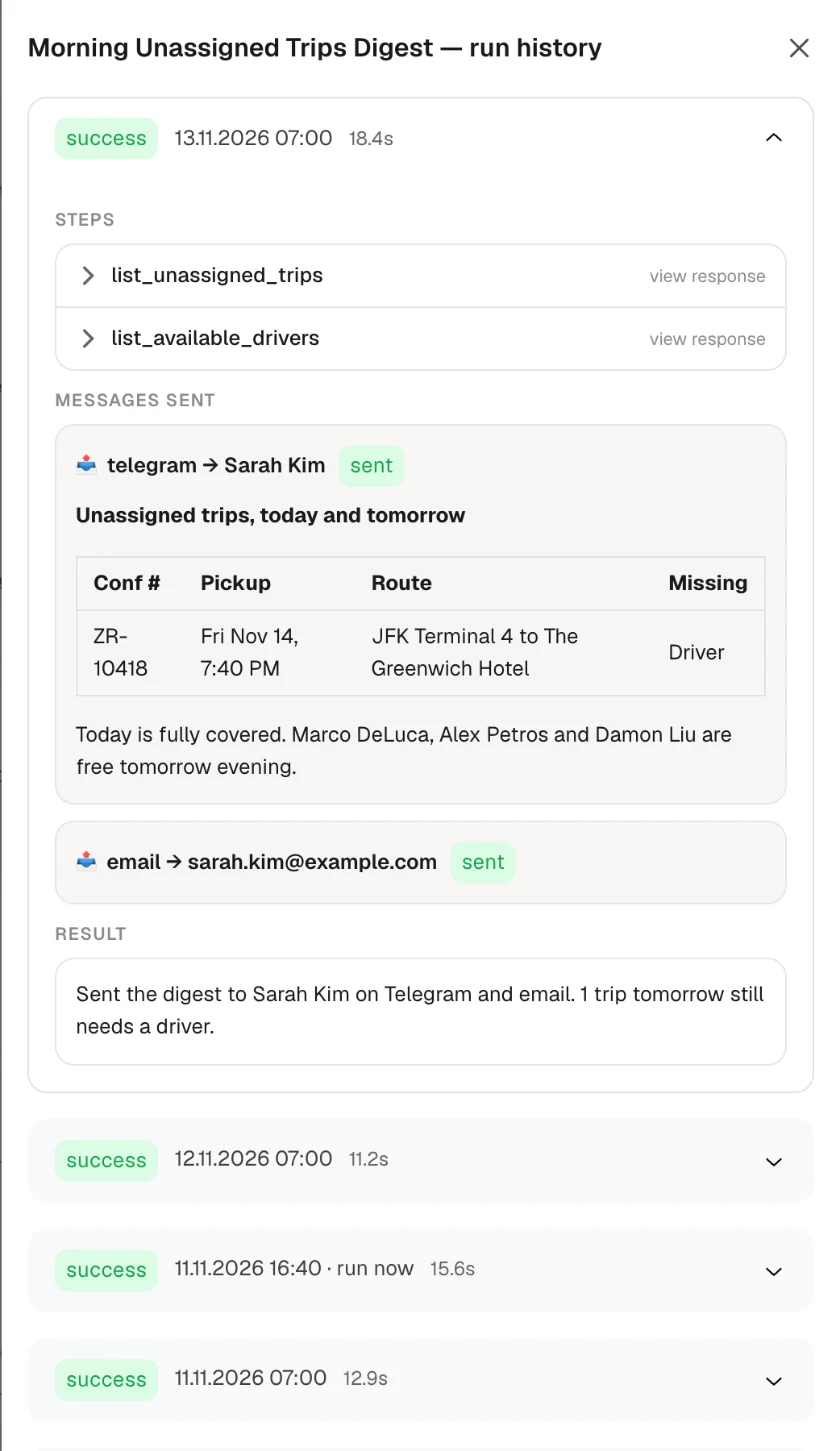
Every run is recorded: what the agent looked at, what it decided, and exactly what it sent. Try a run in preview before anything goes out.

  • Preview a run without sending a message
  • Read the full run history and audit trail
  • An agent pauses itself after repeated failures
An agent's run history in Zarela with the steps it took, the messages it sent, and the result

Agents on every plan

Compare plans
  • Free

    2 agents

    100 runs a month

  • Starter

    5 agents

    1,000 runs a month

  • Pro

    20 agents

    10,000 runs a month

AI agent questions

Will an agent send something to a customer without me?

Only if you set it up that way. Email quotes wait for your approval, and you can preview any scheduled agent before it sends a message. You choose what runs on its own.

What data can the agents see?

Your own company’s trips, reservations, drivers, vehicles, customers, and inbox inside Zarela. Each company’s data is kept separate.

Do I need to write prompts?

No. Start from a template in the gallery. If you want something specific, describe it in plain English and Zarela shows you the plan first.

Where do the results go?

To email, SMS, or a Telegram group, whichever you pick for that agent. Every run also stays in its history inside Zarela.

What counts as a run?

One time an agent does its job, such as one morning digest. Your plan sets how many agents you can have and how many runs they get each month.

ZarelaAI agents

Put your first agent to work

Create a free account, pick a template, and read its first report tomorrow morning.